
Build Clean and Crunch Guitar Sounds
For clear chords, begin with a clean amp, low drive and little ambience. For crunch, raise drive until the hardest stroke breaks up, then bring the output back to a similar loudness. Listen for whether the notes inside a chord remain distinct.
Start the demo or your guitar input, choose Apply prompt, then compare a soft stroke with a hard one. Hear the two examples.
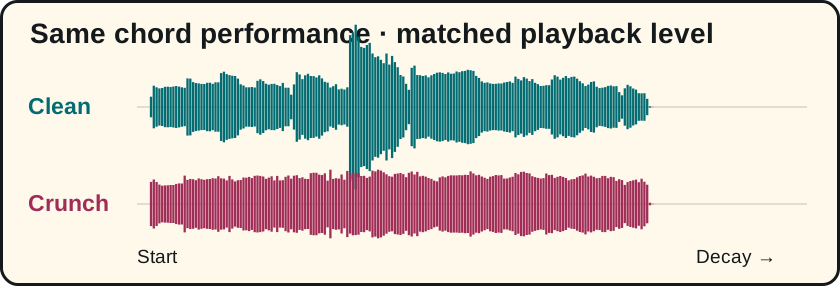
Compare the same performance
We sent the same five seconds of BrowserTones’ own clean-chord guitar recording into the public browser player for both clips, recorded its output and matched the clips to the same integrated loudness. The performance, input file and excerpt are identical. Each prompt chose its own amp and cabinet, so this compares two complete starting sounds.
Clean prompt: “Clean rhythm amp, clear open chords, no delay, no reverb, no chorus.” The player selected a clean amp with drive 0.16. Crunch prompt: “Classic rock crunch, medium drive, dry room, no delay, no chorus.” It selected a crunch amp with drive 0.82. Those values describe the generated sounds in this recording. To find your own edge of breakup, start audio and drag the Drive knob slowly upward while repeating the same stroke.
Keep a clean sound full without adding grit
Set the interface so a strong strum stays below clipping. Use the neck or middle pickup as a starting point if the bridge sounds too sharp. Play a full chord and then two adjacent strings high on the neck. If the low chord booms but the upper notes still sound thin, reduce bass a little and try a warmer midrange before adding more treble or gain. Check against the backing track.
Find the edge of breakup for blues
To hear what Drive alone does, open the clean starting request, apply it once and keep that amp and cabinet. Play the same two-note interval while raising the Drive knob in small steps. The spot where the louder note starts to rasp is your own transition. A fresh tone request can change the cabinet as well.
Pick one note softly, then pick the same note firmly. Move Drive up until the firm note takes on grit while the quiet note stays relatively clear. Turn Output down to compare fairly. If both notes sound equally fuzzy, reduce Drive or roll the guitar volume back slightly. Add a short room only after you like the dry attack.
Keep the gaps in a funk rhythm
Play four short muted scratches followed by an accented chord. Lower drive until the accents pop out again. If the accented chord jumps out too far, ask Keep it clean, add gentle compression and turn delay off
and choose Apply prompt. Check that all four scratches still have a separate attack. For the next adjustment, use the gain and EQ guide or the effect order comparison.
Try the crunch tone in BrowserTones
By BrowserTones · Updated