
Understand Guitar Cabinet Impulse Responses
A cabinet impulse response is a short audio file that describes how a system responds to an impulse. An IR loader uses convolution to apply that response to the guitar signal. It can change the apparent brightness, body and attack of a recorded amp without changing how hard you played.
Start the demo or your live input, choose Apply prompt for the warm cabinet, then try the brighter follow-up below. Hear the two examples.
What comes from the amp and what comes from the cabinet?
Guitar → amp stage → cabinet response → listening output. Raising amp drive changes how the amp responds to your picking, including breakup and compression. A fixed cabinet IR applies the same linear filter to the signal at different levels. It can capture or model the color of a speaker, microphone position and part of the acoustic space. By itself it does not recreate the level-dependent distortion of an overdriven preamp.
Listen to two cabinet responses in isolation
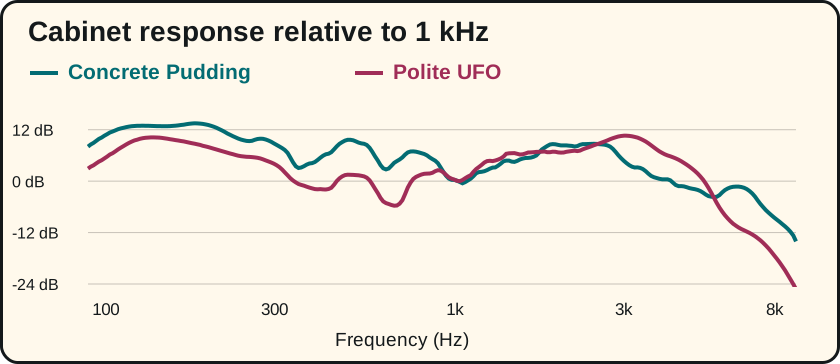
For this A/B we convolved the same five-second BrowserTones chord excerpt with two files from its clean-amp cabinet catalog, then matched the integrated loudness. Only the response file changes before level matching. Both are modeled BrowserTones responses. Listen for the upper strings at the start of the chord and for the body of the lower notes as they ring.
If you like the amount of breakup but the pick edge is too hard, this kind of comparison is worth trying before reducing gain. Keep the phrase, drive and output comparable. Change back to the first cabinet after hearing the second; the louder or more novel choice often seems better on first listen.
Use the cabinet options your rig provides
For a quick choice, play A, B, then A again without touching the volume. Pick the one where you can follow both the lowest note and the pick on the upper strings. If you prefer B alone but A works better under a vocal, keep A for that part. A brighter response is only useful when it leaves the right space in the song.
To try this in BrowserTones, apply the warm cabinet request from this page. Then type Keep the clean amp. Give the cabinet a more open, brighter sound.
and choose Apply prompt. Our player test selected Concrete Pudding first and Polite UFO second, with the same clean amp and drive. A fresh request can produce a different combination. The embedded A/B above isolates the two cabinet responses.
BrowserTones chooses from its built-in cabinet catalog. To load your own IR file, use a separate IR loader that accepts its format. If there is already a cabinet block on that track, bypass it when comparing individual responses. Two cabinet filters in series can sound dull.
For the difference between an amp family and a cabinet swap, play the clean and crunch comparison. If low palm mutes are the problem, use the metal rhythm checks.
Try a warmer cab in BrowserTones
By BrowserTones · Updated